photo 3am_dj_home_zps919fb85e.png photo 3am_dj_about_zps7cce4c75.png photo 3am_dj_website_zps73051235.png photo 3am_dj_ss_zps6759ec2a.png photo 3am_dj_bs_zps43e27832.png
Showing posts with label Technology. Show all posts

Monday, September 29, 2025

SEL AND EF

So, what do social emotional learning and executive function have in common? Feeling good about yourself and learning how to cooperate and work with others are paramount in every person's life. But how are children ever going to develop these skills as they sit in front of a screen? Here are a few simple strategies that might brighten your school day and nurture the WHOLE child.

Social Play
Vygotsky maintained that dramatic play is where children learn to regulate themselves. They take on imaginary roles and must stick to their roles and adjust to changing plots.


Note! Isn't it frustrating that every expert on SEL and EF emphasize the importance of play, while increasingly play is disappearing from our classrooms and children’s lives!!!


Sing and Dance

Music is the perfect opportunity for students to learn to follow directions and develop self-regulation.


IPhone
You can use a play phone or make your own "I" phone similar to the one below. Start each day by passing the phone around the class and asking each child to say a sentence about what they want to learn or do that day. “I …..” Only the person holding the phone is allowed to talk!


Classroom Experts (Karen Stone)
Every student can see themselves as an “expert” with this idea. Make a poster with areas of expertise, such as cutting, writing numerals, writing letters, spelling, tying shoes, etc. Children get to sign their name and put their picture on the poster where they feel they are an expert. Students must consult at least “3 experts” before asking the teacher.


Compliment Circle
Children sit in a circle and the teacher begins by giving a child a compliment. The first child then passes on a compliment to another friend and so on until everyone has had a turn giving and receiving a compliment.
*Let children toss a sponge ball or bean bag around as they compliment each other.
*Give a “hand hug.” Teacher squeezes the first child’s hand, then
they continue to pass the “hand hug” around the circle until it gets
back to the teacher.
*Let each child “pass” a smile around the room.


Brain Hug
Teach children how to give themselves a “brain hug” and you will also help them gain self-control and center themselves.
Thumbs up. (Extend arms in front of you with thumbs up.)
Thumbs down.
Cross your wrists.
Clasp fingers.
Bring your clasped fingers down and in towards your chest and hug yourself.


Pat on the Back
Students raise their right hand, stretch it across their body, and pat their left shoulder as they say, “Good job! Good job!”


*Cut hands out of construction paper. Write positive comments for students and tape them on their backs.

Saturday, July 19, 2025

WRITING CENTER (AND TECHNOLOGY)

WHY?

Emergent literacy will flourish in a writing center. Children will develop a positive attitude about writing with a variety of blank books and tools. Remember, scribbles are how the writing process begins, so whatever the children do should be celebrated.


Materials

Table and chairs

Pens, pencils, crayons, markers

Variety of paper (colored, notepads, different shapes and sizes)

Envelopes

Blank books

Sticky notes

Junk mail

Book order forms, magazine inserts, tax forms (available at library)

Chalkboard and chalk

Dry erase board and markers

Magic slate

Stamps and ink pad

Scissors, tape, stapler

Picture file

Picture dictionary

Class list

Magnetic letters

Clipboard

Used greeting cards

Clipboard
Children will definitely enjoy writing and collecting data with a clip board.


Directions: Each child will need a 9” x 12” piece of corrugated cardboard. Attach a butterfly clip, insert paper, and let the writing begin!


TECHNOLOGY CENTER

Computers are a common part of our everyday lives. Children can use computers to read, write, illustrate, take tests, practice math facts, watch science videos, etc. The opportunities for learning are endless!

Materials

Computers

Paper, pencils

Thursday, February 22, 2024

NATIONAL DAY OF UNPLUGGING

NATIONAL DAY OF UNPLUGGING was created to inspire people to plug out all the devices of the present technology and to spend some time with their loved ones.

www.nationaldayofunplugging.com


It's officially March 7, 2024 (sundown-to-sundown), but I wanted to tell you about it early because it's going to take some planning to get UNPLUGGED for a day.

This link would be great to share with families because there are tons of "unplug" ideas to encourage parents and children to have FUN together.

https://www.unplugcollaborative.org/ndu-what-to-do-collection


There are many things we do in schools that don’t have an impact on children, but I bet if you “unplugged” for one day it would leave a lasting impression. It could also lead to some great learning opportunities. Students could write opinions, do a T-Chart of things to do with a screen and without a screen, graph preferences, make a book about what to do without technology, do a Venn diagram...


BLACKOUT
Have you read BLACKOUT by John Rocco. It’s a delightful tale about what happens when a family in a big city loses power. I won’t tell you what happens, but I bet you can guess. I was talking to some children recently about the “olden days” before televisions, video games, cell phones, and computers. They were stunned and said, “What did you do?” I smiled and replied, “You know what? We played outside and had lots of fun!”


Several years ago a teacher told me that they asked the families at her school to record the amount of screen time their child had for a week. The next week they asked the parents to turn off all devices and spend the same amount of time interacting with their child by reading, playing games, doing chores around the house, going for walks, etc. Do you think most families could survive this? It certainly would be a meaningful challenge!

Sunday, August 13, 2023

WRITING CENTER

WHY?

Emergent literacy will flourish in a writing center. Children will develop a positive attitude about writing with a variety of blank books and tools. Remember, scribbles are how the writing process begins, so whatever the children do should be celebrated.


Materials

Table and chairs

Pens, pencils, crayons, markers

Variety of paper (colored, notepads, different shapes and sizes)

Envelopes

Blank books

Sticky notes

Junk mail

Book order forms, magazine inserts, tax forms (available at library)

Chalkboard and chalk

Dry erase board and markers

Magic slate

Stamps and ink pad

Scissors, tape, stapler

Picture file

Picture dictionary

Class list

Magnetic letters

Clipboard

Used greeting cards


JUST FOR FUN!

Clipboard
Children will definitely enjoy writing and collecting data with a clip board.


Directions: Each child will need a 9” x 12” piece of corrugated cardboard. Attach a butterfly clip, insert paper, and let the writing begin!

Use the clip boards for:
Observations
(weather, nature walk, clouds, etc.)

Surveys
(favorite food, ice cream, animal, sports team, etc.)

Write the room
(2 syllable words, seasonal words, nouns, shapes, letters, etc.)

Read the room
(check off words they find, shapes, letters)

Note taking
(write or draw pictures as they listen to a book or watch a video)

Interviews
(parents, grandparents, friends)

What I learned
(record what they learn as you do a unit of study)


TECHNOLOGY CENTER

Computers are a common part of our everyday lives. Children can use computers to read, write, illustrate, take tests, practice math facts, watch science videos, etc. The opportunities for learning are endless!

Materials

Computers

Paper, pencils


Saturday, February 18, 2023

NATIONAL DAY OF UNPLUGGING

NATIONAL DAY OF UNPLUGGING was created to inspire people to plug out all the devices of the present technology and to spend some time with their loved ones.  

www.nationaldayofunplugging.com


It's officially March 3-4, 2023 (sundown-to-sundown), but I wanted to tell you about it early because it's going to take some planning to get UNPLUGGED for a day.  

This link would be great to share with families because there are tons of "unplug" ideas to encourage parents and children to have FUN together.

https://www.unplugcollaborative.org/ndu-what-to-do-collection


There are many things we do in schools that don’t have an impact on children, but I bet if you “unplugged” for one day it would leave a lasting impression. It could also lead to some great learning opportunities. Students could write opinions, do a T-Chart of things to do with a screen and without a screen, graph preferences, make a book about what to do without technology, do a Venn diagram...


BLACKOUT
Have you read BLACKOUT by John Rocco. It’s a delightful tale about what happens when a family in a big city loses power. I won’t tell you what happens, but I bet you can guess. I was talking to some children recently about the “olden days” before televisions, video games, cell phones, and computers. They were stunned and said, “What did you do?” I smiled and replied, “You know what? We played outside and had lots of fun!”


Several years ago a teacher told me that they asked the families at her school to record the amount of screen time their child had for a week. The next week they asked the parents to turn off all devices and spend the same amount of time interacting with their child by reading, playing games, doing chores around the house, going for walks, etc. Do you think most families could survive this? It certainly would be a meaningful challenge!

Tuesday, June 28, 2022

PD #12 KINDER KEYBOARD


This keyboard can be used to familiarize students with electronic devices that they will be using at school.

Note! Keyboards vary, so you use the one commonly found in your classroom for your template.

What? shower curtain liner, permanent marker, fly swatter

Why? letter recognition, names, sight words, sounds

When? Large group, small group, learning center, partner practice

How? There are two ways you can make this.

1. Cut the shower curtain liner in half and tape it horizontally to a wall. Place the attached pattern on a document camera and project on the shower curtain. Trace around the keys and letters with a permanent marker as shown.

2. Make a template for the keys. Starting in the middle of the shower curtain make 11 squares horizontally for the first row. Continue drawing off the rest of the keyboard. Write the letters and command keys as indicated. (I made mine on our kitchen island and it was easy to draw that way.)


Hint! Use one color to outline the keys and a different color to write the letters.

Cut the shape of a mitten out of the fly swatter.

*Place the giant keyboard on the floor or on a bulletin board and let the children use it to practice identifying letters.

*Call out a sound and have children tap the letter that makes that sound.

*Have children type out names, sight words, or spelling words.

*For a partner activity, have one child hold a word and check while their partner types it.


Personal Device

Pocket folders are on sale now, so with a little bit glue and a keyboard pattern can make a “personal device” for each student that they will be able to use all year long.


What? pocket folder, keyboard pattern, glue, index cards, marker

Why? names, sight words, letter recognition, vocabulary words

When? large group, small group, learning center, independent practice

How? Glue the keyboard pattern to the right inside pocket of the folder as shown. Let children decorate the outside with markers. Write names, sight words, letters, and other information you want the children to practice on index cards. Place in the left pocket. Children choose a card and put it on the top of their “screen.” After they type the information they save it in the pocket on the right.


*Ask children to write the letter or word after they’ve typed it.


Friday, January 21, 2022

DESIGN ON A DIME

I was "visiting" some of my old blogs and found these ideas for your classroom that might rival HGTV.

How about addition facts on the stairs? The science vocabulary leads to the upper grades. Letters, numbers, shapes and so many skills could “step up” learning.


What a clever idea to use a real picture frame to display children’s artwork!


And you know how much kids love to look at themselves in a mirror. You could put a full-length mirror in each hall with a positive word or character trait.


Showtime on the Smart Board! (KIRPC Head Start, Indiana)
Take some sheets, tie the ends with ribbons, and then hang it on hooks around the smart board.


Out the Door (Nacine Barrow)
Encourage the children to bring in environmental print and post them along with sight words on your door. Students have to read two of the words before exiting the classroom.


Chalk Board Table
Is this cool? Ms. Smalls found an old table they were going to throw away. She painted the top with chalkboard paint and let the children write special messages, draw pictures, write sight words, etc. on it. The kids LOVED it!
                                  

Saturday, April 4, 2020

HOME LEARNING WITH SEESAW


This is a post from my good friend Betsy Cruz.  I met her over a year ago at the SCKA Conference and she told me a little bit about Seesaw.  It's almost too good to be true.  Oh, yeah, and it's FREEEEEE! 
Seesaw The Learning Journal is a free app, available on all platforms, that allows students to share their learning in creative ways. Students can show what they know with photos, drawings, audio or video recordings, notes, and links to projects, all of which are compiled in a digital portfolio. My students use it frequently in many ways. They take photos of their writing and record their voices reading it, record themselves explaining how they solve a math problem, take a picture of a leaf they found and use drawing tools to label it, etc.


Now, as my school has gone to remote learning, I have turned to my old friend, Seesaw, to reach out to students at their homes. Seesaw made their class app available for home learning, (with private home learning codes), and Seesaw offers wonderful remote learning resources. https://web.seesaw.me/remote-learning. In addition to student generated projects, Seesaw also allows teachers to create and assign activities with specific tasks for their students. Teachers can share activities to the extensive Seesaw Library, which all teachers can access to find and assign activities to students.

Knowing that my school was going to distance learning, I thought it was time that I started creating activities for my students, and to share with other teachers. I knew students would be using much more technology than might be best for little ones. So, I wanted to create some activities that combined technology with the philosophy of Dr. Jean activities, which
emphasize hands-on, real experiences, language, music, art, developing social skills, etc. (I could go on and on!)

I have made several activities, using Dr. Jean as inspiration. They are based on Dr. Jean songs, finger plays, or blog ideas. For the student task, I tried to create multiple options, such as draw a picture, write about it, record thoughts and knowledge, etc.

In “Coronavirus Avengers”, students watch Dr. Jean’s video, take a selfie and use drawing tools to make themselves Coronavirus Avengers. They also have the option to draw what they think coronavirus looks like.


https://app.seesaw.me/#/activities/library?profile=pub.person.684f8024-6991-4770-820f-035208495ed6&promptId=prompt.6c1f7e19-6c43-4512-b7e2-c14ed152dcef

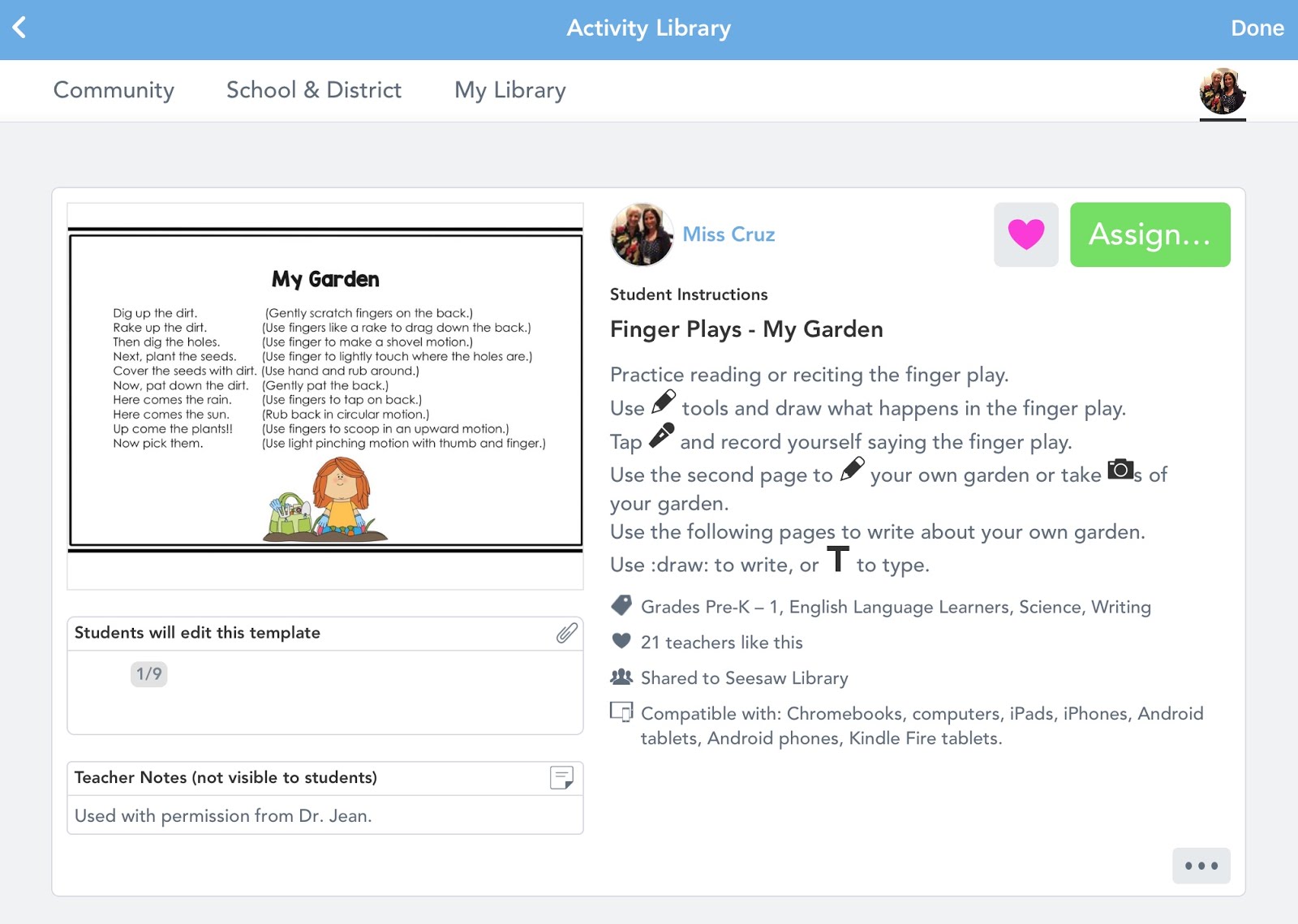
In “Finger Plays – My Garden” students record themselves reciting the finger play, have the option to draw their own garden or take a photo of their garden at home, and then write about their garden. Teaching these finger plays during a circle time video chat is a tip I just learned from Dr. Jean!


https://app.seesaw.me/#/activities/library?profile=pub.person.684f8024-6991-4770-820f-035208495ed6&promptId=prompt.e20ebb0a-33bf-4657-aa15-f8d180c88b02

“Spring – O” gives students a board with pictures of signs of Spring that students mark with a drawing tool as they find them. Then they have the option on pages that follow to take photos or draw pictures of what they found. They can also write about or record their voices talking about what they found. 


https://app.seesaw.me/#/activities/library?profile=pub.person.684f8024-6991-4770-820f-035208495ed6&promptId=prompt.4c443a8d-307b-4feb-ac40-64ad52bc2975

In times like these, I am very grateful to be able to collaborate with educators around the world. Seesaw and Dr. Jean have been a great part of that. You can sign up for Seesaw at web.seesaw.me or by clicking “try” from one of my activities.


Friday, July 12, 2019

DIY GIANT KEYBOARD

This keyboard can be used to familiarize students with electronic devices that they will be using at school.

Note! Keyboards vary, so you use the one commonly found in your classroom for your template.

What? shower curtain liner, permanent marker, fly swatter

Why? letter recognition, names, sight words, sounds

When? Large group, small group, learning center, partner practice

How? There are two ways you can make this.

1. Cut the shower curtain liner in half and tape it horizontally to a wall. Place the attached pattern on a document camera and project on the shower curtain. Trace around the keys and letters with a permanent marker as shown.

2. Make a template for the keys. Starting in the middle of the shower curtain make 11 squares horizontally for the first row. Continue drawing off the rest of the keyboard. Write the letters and command keys as indicated.  (I made mine on our kitchen island and it was easy to draw that way.)


Hint! Use one color to outline the keys and a different color to write the letters.

Cut the shape of a mitten out of the fly swatter.

*Place the giant keyboard on the floor or on a bulletin board and let the children use it to practice identifying letters.

*Call out a sound and have children tap the letter that makes that sound.

*Have children type out names, sight words, or spelling words.

*For a partner activity, have one child hold a word and check while their partner types it.


Personal Device

Pocket folders are on sale now, so with a little bit glue and a keyboard pattern can make a “personal device” for each student that they will be able to use all year long.


What? pocket folder, keyboard pattern, glue, index cards, marker

Why? names, sight words, letter recognition, vocabulary words

When? large group, small group, learning center, independent practice

How? Glue the keyboard pattern to the right inside pocket of the folder as shown. Let children decorate the outside with markers. Write names, sight words, letters, and other information you want the children to practice on index cards. Place in the left pocket. Children choose a card and put it on the top of their “screen.” After they type the information they save it in the pocket on the right.


*Ask children to write the letter or word after they’ve typed it.


Here's a link to the keyboard that I used:

https://www.drive.google.com/file/d/1sNtYFYyQylMSSMDX5RY7TduHRpfDijlo/view?usp=sharing

Have you checked out the new project that Carolyn Kisloski and I created?


http://drjean.org/html/songs/Playing-index.php

Sunday, April 14, 2019

SEESAW INTO WRITING AND TECHNOLOGY

You're going to love this blog from Betsy Cruz! I met her at the Southern California Kindergarten Conference and she showed me how her children used technology to integrate nursery rhymes and finger plays in a meaningful and FUN way. It might be just what you are looking for right now to spark writing and reading!


Being a teacher of English language learners, and well, a teacher of five and six year olds, I know how important the development of oral language is. Fortunately, I have inspiration from Dr. Jean to help make this engaging for kids. I use ideas from Dr. Jean’s Happies, Teacher Survival Kit, songs, and best of all, free ideas from her blog.

Young children love an audience. With the FREE "Seesaw: The Learning Journal" app that I use, they have one.  
https://web.seesaw.me/   Students can record and share work of drawings, photos, audio recordings, videos, and more. They are able to use technology to show off their oral language skills, and countless other skills. Parents connect with their child’s journal from their own devices and get to see the projects that the children create at school. For the parents who may have trouble with this technology, I invite them to see their child’s work from our devices at school. We use both Chromebooks and iPads, but it is also available on Android devices, computers, and Kindle Fire.


When learning Dr. Jean’s finger play, Black Bird, my students first acted it out with their fingers, enjoying changing partners as their audience.They were also excited to illustrate it in their art journals. Seesaw allows them to record audio on top of a picture, so their next task was to take a photo of their drawing, and record themselves reciting the finger play. Knowing they would be recording their voices, and that their parents would get to see it on their device at home, there was great motivation for rehearsal.
                                                               
When practicing Humpty Dumpty, they illustrated it to show sequencing of the nursery rhyme. Then they were able to take a photo of it and record themselves reciting it. Some even sang it for the recording. Imagine the pride, confidence, motivation, and dare I say it, enjoyment, they get from doing these activities!


Their latest project has incorporated a new, yet simple art project from Dr. Jean. If you seal an envelope and cut it down the middle, you can turn the halves into puppets! Students designed their puppets and told stories with them. Their language skills have improved their writing throughout the year, and they were very motivated to write creative stories about their puppets. Taking a photo of their puppet to read and record their story was a cherry on top of the puppet sundae!


elizabeth_crus@cesd.us

San Marino Elementary